To move the gradebook total column to the front:
Step 1: Access a course.

Step 2: In the Course Navigation, click or tap Grades.

Step 3: Move the cursor over the Total column, and click or tap the Options menu icon.

Final Step: Click or tap Move to front.

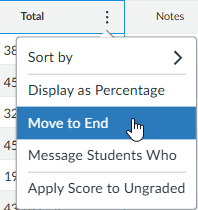
Note: To move the Total column back to the end move cursor/mouse over the Options menu icon in total column then click or tap Move to end.

Comments
2 comments
This is super helpful because if there are lots of grades entered, it is such a pain to have to scroll all the way over for the total grade.
Please sign in to leave a comment.